-
+86 13720060320
-
lanna@haitangs.com

Torque Hinge for Industrial HMI Panels: Selection Guide
An industrial HMI panel needs a torque hinge — a friction hinge that holds the screen at the chosen viewing angle without a gas spring, stay arm, or lock — and the real selection work is sizing it to the full moving load (screen, enclosure, cables, gasket, bezel) and confirming it still holds after vibration, repeated operator adjustment, and real production conditions. A free-swinging hinge drifts: the display falls, the operator holds it with one hand, and the feel varies from machine to machine. This page covers what to specify for the HMI case; for hinge geometry and product options, see the 360° Swivel Torque Hinges.
Quick answer: when an HMI panel needs a torque hinge
| Use a torque hinge when… | Avoid or recheck when… |
|---|---|
| The HMI panel must hold a viewing angle | The panel only needs free swing |
| Operators adjust the panel frequently | The required torque was never calculated |
| The panel must stay open during service | The panel is too heavy for the hinge range |
| Space is too tight for a gas spring or stay arm | The center of gravity sits far from the hinge line |
| The OEM needs a consistent feel across machines | Vibration, cycle life, or cable load is unreviewed |
In short: a torque hinge fits when an HMI panel needs controlled positioning and hands-free stability, not just rotation. The decision should come from the complete moving load, not the screen size on its own.
Why HMI panels are harder than they look
An HMI panel is rarely just a screen. The moving assembly usually combines the display, a metal or plastic enclosure, touchscreen glass, a cable harness, a gasket, a mounting frame, and sometimes a handle or bezel. Even a panel that feels light by hand can put its center of gravity well forward of the hinge line — and that offset, multiplied by the weight, is the moment the hinge actually has to hold. A hinge that felt fine on an early prototype will drift once the final display, cables, gasket, and enclosure are in place. So the hinge is sized from geometry, not from the screen diagonal: confirm the total moving weight, the distance from the hinge axis to the center of gravity, the required working angle, the number of hinges, and a safety margin before any model is chosen — the torque hinge calculator turns those inputs into a target torque. If those inputs are unknown, the selection is not ready for approval.
What makes HMI different from a desk monitor is the environment around it. The panel is opened and tilted while a machine is running, often by an operator wearing gloves, and it must hold at several working positions — a shallow angle for quick input, a steeper one for setup, near-vertical for service access. The torque margin has to be enough that the panel stays put across that whole range, not only at the catalog maximum angle. If the assembly also includes service access or a separate panel door, our HMI & Operator Panel Hinge Solutions page compares the wider hinge-family route.
From the field: a dual-axis HMI mount that holds tilt and rotation
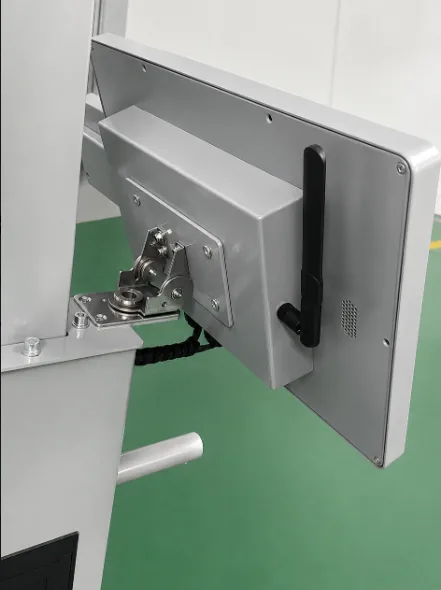
The mount shown here is a real example. It carries a stainless-steel industrial HMI display indoors, and uses a dual-axis constant torque hinge — 7.0 N·m on the tilt axis and 3.0 N·m on the rotation axis. Splitting the torque between the two axes is deliberate: the heavier tilt motion (fighting gravity as the screen pivots up and down) needs more holding force than the lighter left-right rotation, so a single shared value would be either too stiff to turn or too weak to hold. The hinge also routes the display’s cable harness through a central bore, so the cables turn with the panel instead of fighting it — a common cause of drift when the harness is run around the outside of the pivot.
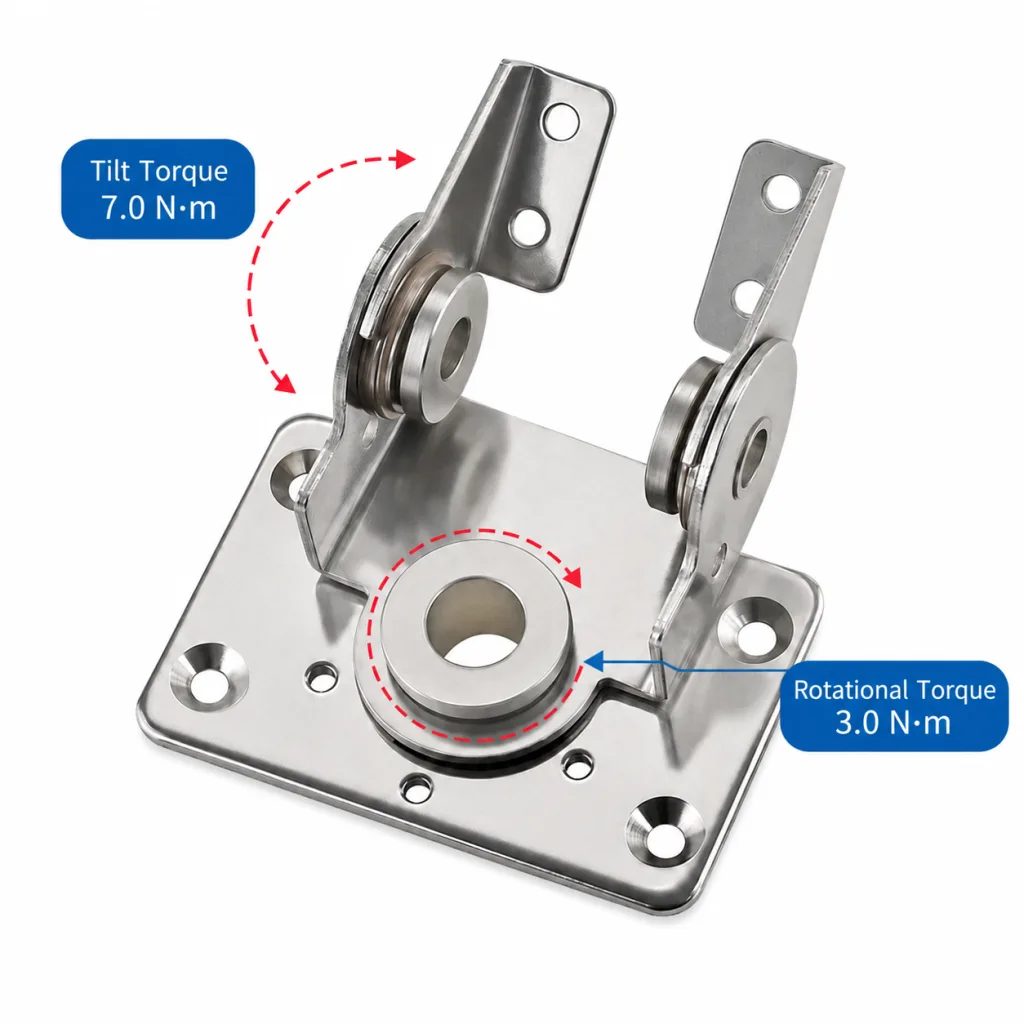
Because this is an OEM display where every unit must feel identical on the line, a constant (factory-set) torque was specified rather than an adjustable one. In our own cycle testing, the hinge held its position with roughly 15% torque decay after 10,000 cycles — still well within a usable holding range for a panel of that weight. That is the real test for an HMI hinge: not that it survives the cycles, but that it still holds the screen where the operator left it after thousands of adjustments.
The HMI-specific risks: vibration, cable load, and frame flex
Three things cause HMI panels to drift that a desk-monitor spec never accounts for, and all three sit outside the hinge itself:
- Vibration and impact. The panel is mounted to a machine that vibrates, gets bumped, and may be transported before install. A hinge that holds in a static bench test can creep in a vibrating frame if the torque margin is thin — so validate on the real machine, not a fixture.
- Cable load. Power, signal, Ethernet, and ground wires can pull the panel closed, resist opening, or change its balance. Route the harness through or close to the pivot axis (as in the example above) and test movement with the final cabling installed — a torque hinge should not be asked to compensate for a harness that fights it.
- Frame flex. The hinge transfers holding force into the panel wall and bracket. A correct hinge on a thin or unsupported sheet-metal housing still feels loose; reinforce the mounting area, and for plastic enclosures add bosses, inserts, or a backing plate.
The recurring lesson is that an HMI hinge is part of a system. Validate it in the final assembly — real panel, real frame, real cables — and the question to answer is simply whether the panel still holds its working positions after that. If it doesn’t, the cause may be torque, hinge type, mounting stiffness, panel weight, or cable routing, so review the whole assembly before blaming the hinge.
Constant vs adjustable, cycle life, and material
Three further checks are shared with all torque hinges, so confirm them but don’t re-derive them here. For constant vs adjustable: constant (factory-set) torque suits a frozen, high-volume HMI design where every unit must feel the same; adjustable suits products still in development, machine variants with different screens, or builds that need tuning — but the setting must be documented and locked, or two machines drift apart. The full trade-off is in the constant vs adjustable torque hinge guide.
For cycle life: HMI panels are adjusted constantly, so what matters is torque retention, not just survival — confirm how much holding torque remains after the expected cycles, covered in the torque hinge cycle life guide. For material: match it to the environment — stainless for washdown, humid, coastal, or coolant-exposed machines; zinc-plated or coated steel for dry indoor equipment.
If you’re still deciding which hinge type the application needs at all, start from the broader framework in how to choose an industrial hinge.
When the HMI spec is set, share the panel weight, center-of-gravity distance, opening angle, cycle target, mounting method, cable routing, and environment, and our engineering team can match a torque hinge to the real assembly rather than the screen size.
FAQ
When should an industrial HMI panel use a torque hinge?
When the screen or control panel must stay open, hold a viewing angle, or move with controlled resistance – especially when operators adjust it during setup, inspection, or service and need both hands free. If the panel is set once at install and never moved, a simpler hinge may be enough.
How do I size a torque hinge for an HMI panel?
Start from the total moving weight – screen, enclosure, cables, gasket, and bezel – and the distance from the hinge axis to the center of gravity, then the required working angle. The moment, not the screen size, sets the torque. Add a safety margin for cable load and operator handling, and size from geometry rather than the screen diagonal.
Why does an HMI panel drift after installation?
Usually because the holding torque is too low for the real moment – the center of gravity is farther from the hinge line than expected, the panel gained weight after design changes, the harness pulls on it, the mounting frame flexes, or the hinge lost torque after cycling. Vibration from the machine makes a thin torque margin worse.
Should an HMI panel use constant or adjustable torque?
Constant (factory-set) torque suits a frozen, high-volume design where every unit must feel identical. Adjustable torque suits products still in development, machine variants with different screens, or builds that need tuning during assembly – with the setting documented and locked so units stay consistent.